


 RU
RU
Moving USDT to a different wallet might seem easy, but it can actually lead to problems. If you pick the wrong blockchain, use a token type that's not supported, or don't consider the transaction costs, your money could end up in the wrong spot. So, sending USDT is trickier than you might think.You need to clearly understand which network you are using, which wallet receives the funds, and how the transfer works technically.
In this guide, we explain how to transfer USDT to another wallet safely and without unnecessary risks. We'll go over the basics, compare different networks and token types, and show you a real-world example using the TRON blockchain. This will give you a solid idea of how to transfer USDT the right way and steer clear of any costly errors.
What Is USDT?
USDT (Tether) is a stablecoin that's tied to the US dollar. Basically, one USDT token is supposed to be worth one US dollar. People often use it in the crypto world as a digital version of regular money for common transactions:
- transferring funds between wallets
- long-term value storage
- withdrawing assets from exchanges
- locking in value without exposure to market volatility
It is important to understand that USDT is not a single coin. It exists as a token on multiple blockchains. That is why every transfer is performed within a specific network. Whether you want to understand how to send USDT to someone or move funds between your own wallets, the network choice is always critical.
Key Characteristics of USDT
USDT is currently issued on more than 13 active blockchains. Most of the actual trading and activity centers around a few big players. These are TRON (TRC-20), Ethereum (ERC-20), BNB Smart Chain (BEP-20), plus Polygon, Arbitrum, Optimism, Avalanche, Solana, and TON. Other networks exist, but their activity is significantly lower.
From a technical perspective, the most important point is that each network has its own smart contract and address format. Addresses from different blockchains are not compatible. If you try how to send USDT to another wallet using the wrong network—for example, sending TRC-20 USDT to an ERC-20 address—the transaction may be confirmed on-chain, but access to the funds is usually lost.
This leads to a simple but critical rule. Before you send USDT, always verify:
- the withdrawal network
- the deposit network
- the wallet address format
Any mismatch almost always results in lost funds or long, often unsuccessful, recovery attempts through customer support.
Another important detail is transaction fees. Fees are not set by USDT itself. They are defined by the blockchain. The same transfer of 100 USDT may cost a fraction of a cent on TRON, while on Ethereum it can cost tens of dollars. That is why choosing a network is not about “cheaper or more expensive” in theory, but about what your wallet or service actually supports.
Blockchain Networks for Sending USDT
Let’s look at the most commonly used networks for USDT transfers.
USDT TRC-20
TRC-20 USDT operates on the TRON blockchain and is widely used for everyday transfers. TRON is popular due to its fast transaction confirmations and relatively low fees, which makes it one of the most practical answers to how to send USDT on TRON network.
When you send USDT on TRON, two network resources are involved: energy and bandwidth. Energy is consumed when executing smart contracts, while bandwidth is used to transmit transaction data. If your wallet balance is low, the TRON network will automatically use TRX to cover the costs.
TRX is TRON's digital coin and it's used for transaction fees, staking, and voting for validators. The actual TRX fee for a USDT transfer depends on network load and the amount of available resources on your address. On average, how to send USDT TRC20 without staked resources costs between 6.43 and 13 TRX.
Bandwidth is required even for USDT transfers because part of the transaction load is covered by it. Every active TRON account receives 600 free bandwidth points daily. Staking TRX can give you extra bandwidth and energy. Because of this, TRON is quick and cheap, making it a good option if you send transfers a lot.
USDT ERC-20
ERC-20 is the normal token format for the Ethereum blockchain. It sets up a standard smart contract structure that allows checking balances, moving tokens, and setting permissions for using decentralized apps.
Because of this standard, many wallets, exchanges, and DeFi protocols automatically support USDT on Ethereum. Ethereum is picked not for its speed or low fees, but because it has a built-up base and system. Over $30 billion in USDT is used on Ethereum, and big players often depend on it.
But this stability isn't cheap. All Ethereum transactions need gas fees paid in ETH. Gas prices change depending on network traffic. When things are quiet, moving USDT ERC-20 might cost a few dollars, but when things are busy, fees can jump a lot. That's why Ethereum isn't normally used for everyday transfers or P2P payments.
If users ask how to send USDT without ETH, Ethereum isn't the best way. If you don't have ETH in your wallet, the transaction can't go through. In these cases, TRON or BNB Smart Chain are usually more useful.
USDT BEP-20 (BSC)
On the BNB Smart Chain, USDT follows the BEP-20 standard. It's like ERC-20 but runs on its own blockchain, made for faster speeds and cheaper fees.
BSC's strength is that it's budget-friendly. Transaction fees, paid in BNB, typically run from $0.10 to $0.30. Even when the network is busy, fees rarely go over a dollar. This makes BEP-20 a go-to for users wanting to send USDT to another wallet quickly and on the cheap.
BSC also has quick block times and a solid DeFi scene. That being said, it's more centralized than Ethereum, with fewer validators. Plus, not all exchanges and wallets accept BEP-20 USDT, especially if they're not part of the Binance world. Always double-check support before moving funds.
BSC is also faster. Blocks on BNB Smart Chain are created about every three seconds, and the network can handle 100–200 transactions each second. This makes BEP-20 USDT a handy choice for transfers between exchanges, wallets, and services within the BSC ecosystem. For users looking to send USDT to another wallet fast and with fees they can count on, this network is often a good pick.
It's also good to note the ecosystem. Around $9.9 billion in total value locked is on BNB Smart Chain. PancakeSwap is the biggest decentralized exchange on the network. It deals with hundreds of billions of dollars in trading volume each year and has millions of daily users. For simple DeFi stuff and USDT transfers, this setup is usually enough.
Though, there are downsides. BNB Smart Chain is more centralized than Ethereum. The network runs with only 21 validators handling transactions and producing blocks, and Binance controls much of it. For comparison, Ethereum has hundreds of thousands of validators.
Another point is liquidity and support. The total USDT on BSC is less than on Ethereum—about $8 billion versus over $30 billion on ETH. So, not all wallets, exchanges, and other services support BEP-20 USDT, mainly outside the Binance ecosystem.
All in all, USDT BEP-20 is a mix of speed, low fees, and decentralization. It's good for everyday transfers, P2P transactions, and basic DeFi uses. But, before sending USDT to another wallet with BSC, make sure the other platform supports it.
USDT on Polygon, Arbitrum, Optimism, and Avalanche
USDT transfers are not limited to Ethereum, TRON, or BNB Smart Chain. Many users also rely on Polygon, Arbitrum, Optimism, and Avalanche The first three options are Layer-2 or sidechain solutions running on Ethereum. They mainly aim to ease busyness on the network to speed up transactions and lower costs. Though Avalanche is its own blockchain, it still works with Ethereum standards.
All these networks use familiar Ethereum-style addresses starting with “0x”. You can use wallets like MetaMask and Trust Wallet for USDT without any extra steps. USDT works like other ERC-20 tokens, but its transactions happen using different tech.
The difference becomes obvious when it comes to fees and speed. It can be expensive to move 100 USDT on Ethereum when the network is busy; you might pay $25–75. Layer-2 networks offer a much cheaper option. For instance, Polygon transactions usually cost just $0.01–0.05. Arbitrum runs about $0.05–0.20. Optimism comes in at $0.03–0.15. Avalanche is up to $0.50. Confirmation times usually range from one to a few seconds. This is why these networks are often chosen by users who need how to transfer USDT frequently within DeFi ecosystems.
There are, however, important nuances. First, not all exchanges and services support deposits and withdrawals of USDT on these networks. Major platforms like Binance and OKX work with Polygon and Arbitrum, but a significant number of exchanges still accept USDT only on Ethereum.
Second, there is the issue of bridging. If you send USDT to a Layer-2 network and later want to move it back to Ethereum or to a platform that only supports ERC-20, you'll need to use a bridge. Keep in mind that bridging can take anywhere from a few minutes to several hours and comes with extra costs.
So, before you send USDT to someone using Polygon, Arbitrum, Optimism, or Avalanche, double-check if they support that network and think about where you might want to withdraw the funds later.
USDT on Solana
USDT on Solana is chosen for its high speed and extremely low fees. Solana is a Layer-1 blockchain with a unique design. It uses the SPL token standard, like Ethereum's ERC-20, but they aren't exactly the same.
Solana creates blocks pretty fast, about every 0.4–0.8 seconds, and it can process up to 4,000 transactions each second. Sending USDT costs only about $0.0001–0.001, even when the network is busy.
One thing to keep in mind is that Solana doesn't work with the Ethereum virtual machine. Its wallet addresses also look different, using long base58-encoded strings. You can't use MetaMask, a popular Ethereum wallet, with Solana. Instead, people use wallets such as Phantom or Solflare.
Even though Solana performs well, it has had network problems before, with outages that lasted for hours at times. In addition, not all exchanges support USDT in SPL format. Large platforms like Binance and Bybit do, but many centralized exchanges still prefer ERC-20 or TRC-20.
Solana is great for trading and DeFi stuff within its own system. But, if you want to do things like send USDT to wallets on other platforms, TRC-20 or ERC-20 are usually better because they work with more systems.
USDT on TON
less than a penny. Since The Open Network works closely with Telegram, it can reach a huge number of users.
Millions of Telegram users are already using USDT on TON through the built-in Wallet. But, outside of Telegram, support is still not as widespread. Some exchanges and other wallets might not show TON-based USDT the right way.
Before you transfer any money, make sure the wallet you're sending to actually supports USDT on TON. The network is growing fast, and there are more DeFi platforms, NFT marketplaces, and payment services popping up, which makes TON more and more useful for regular crypto payments.
How to Send USDT on the TRON Network (Step-by-Step)
Let’s look at how to send TRC20 USDT using the TR.ENERGY Wallet as an example.
Step 1. Verify the network
Confirm that the recipient accepts USDT on the TRON network (TRC-20). This single check prevents most transfer errors.
Step 2. Open your wallet
Launch TR.ENERGY Wallet and make sure you have sufficient USDT balance and either TRX or available network resources.
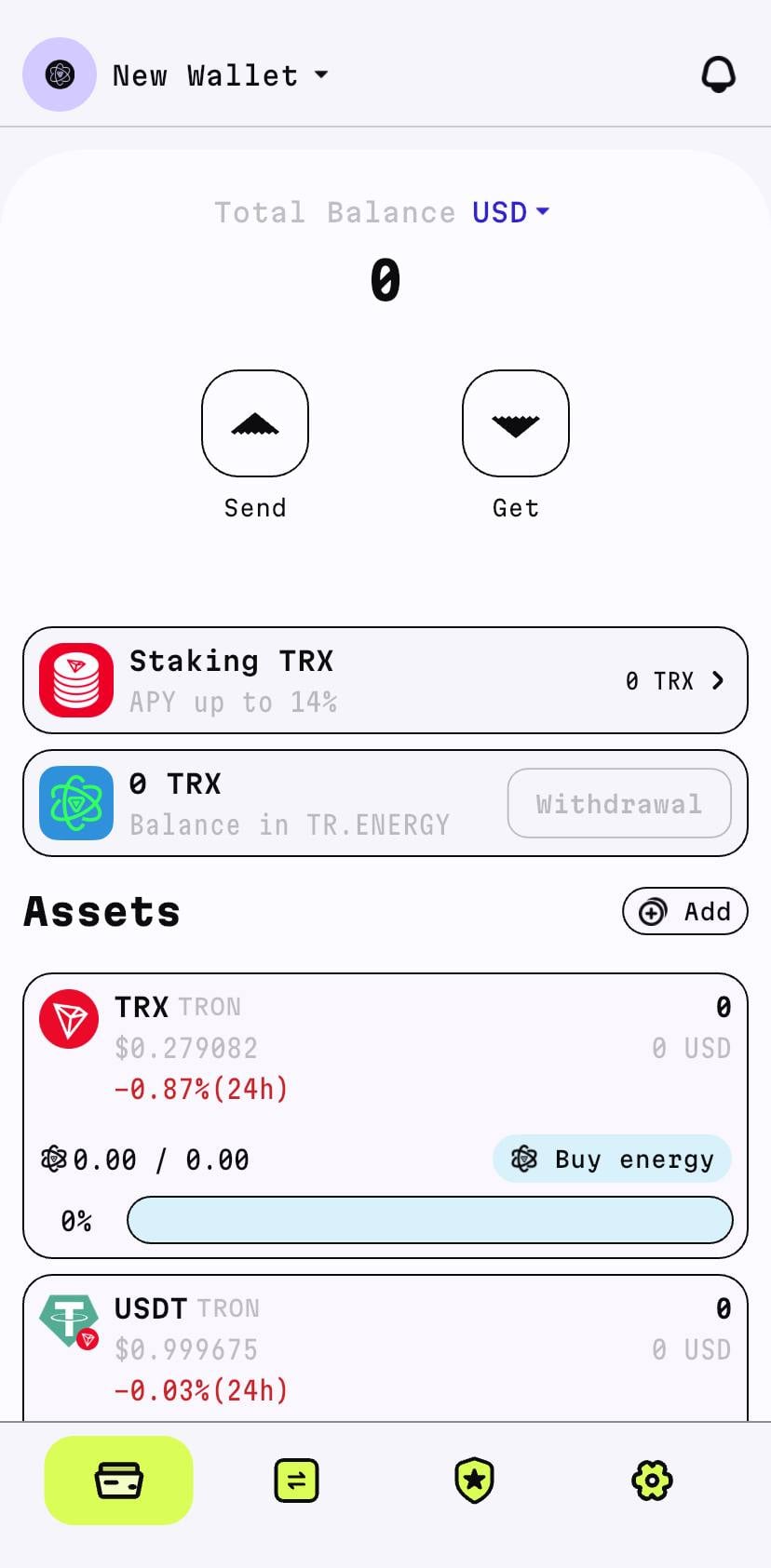
Step 3. Enter transfer details
Tap “Send”, paste the recipient’s TRON address, and enter the amount. TRON addresses always start with the letter “T”. At this stage, you are performing how to send USDT to another wallet, so double-check all details.
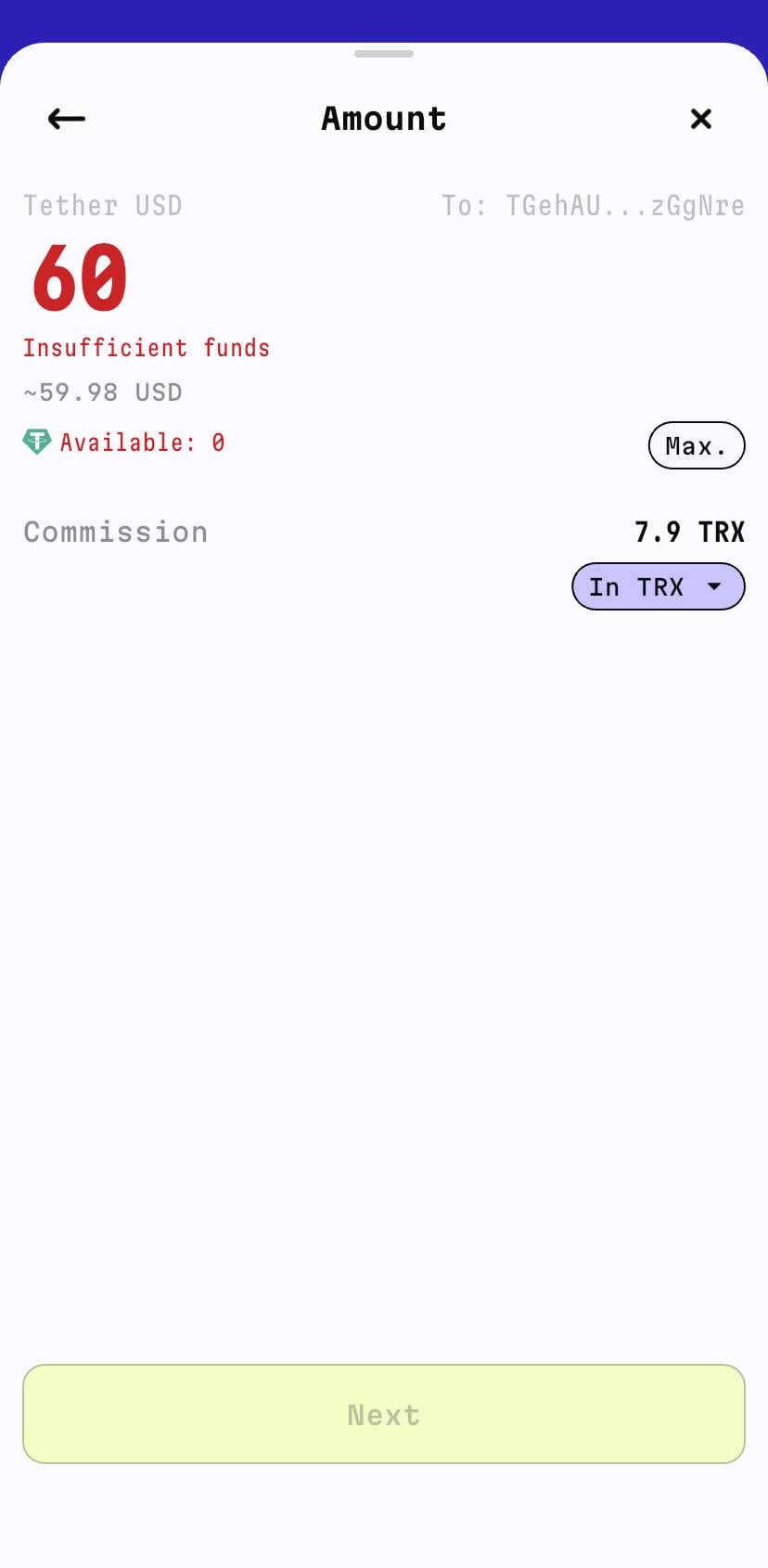
Step 4. Confirm the transaction
Review the fee, confirm the transfer, and wait for processing. On TRON, USDT transfers usually complete within seconds or a few minutes.
USDT Transfer Fees
USDT transfer fees depend entirely on the blockchain, not on Tether itself.
On TRON, fees are based on energy and bandwidth usage and are paid in TRX if resources are insufficient. Without staked resources, a typical USDT transfer costs around 6.43–13 TRX.
On Ethereum, fees are paid in ETH and vary depending on gas prices. During periods of high congestion, sending USDT can be significantly more expensive than on other networks, which is why many users look for how to send USDT without ETH by choosing alternative blockchains.
On BNB Smart Chain, fees are paid in BNB and usually remain low and stable. On Solana, fees are paid in SOL and stay minimal even during high activity.
Ultimately, your choice of network determines both how much you pay and which technical constraints you need to consider.
Common Mistakes and How to Avoid Them
The most common mistake when sending USDT is selecting the wrong network. For example:
- a user sends TRC-20 USDT to an ERC-20 address
- the transaction is confirmed on-chain
- the funds never arrive in the recipient wallet
In most cases, such funds are permanently lost.
Another frequent issue is insufficient balance of the native coin or network resources. When sending stablecoins, remember you'll still need some TRX, ETH, BNB, or SOL for the fees. Also, be careful with wallet addresses! Blockchain transactions can't be undone, so even one wrong letter means your coins are lost forever.
So, here's the simple rule: Double-check the network, token type, the receiver's address, and the fees before you send USDT or anything else.
Specializing in the TRON ecosystem and in-depth analysis of TRX staking, energy rental, and USDT TRC‑20 fee optimization. I help users and businesses efficiently manage digital assets, delegate energy, and work with non-custodial wallets.